
The interactive Excel learning platform
You learn Excel by doing it.
No dry text, no workbooks to download, no videos to pause and you don't even need Excel. Everything happens in your browser, and every time you make a mistake you see straight away what went wrong.
- You type your formulas in a real worksheet that calculates just like Excel
- You click your way around a ribbon with the same tabs and buttons as Excel
- You make charts, pivot tables and conditional formatting
- You train shortcuts and revise with flashcards
- You earn three certificates, from beginner to expert
80 lessons · 800+ exercises · 350+ flashcards & many more
- Free start
- 3 lessons, no account
- No install
- Runs in your browser
- Instant feedback
- On every formula
- Your country
- UK, Irish or US Excel
Try it yourself
How many coffees were sold this week? Work it out in B7 and press Enter. Feel free to get it wrong first, for example with =SUM(B2:B5).
What is LearnExcel?
LearnExcel is an online Excel course where you practise in a worksheet in your browser. You get 80 lessons, from your first formula to pivot tables and INDEX with MATCH, plus timed tests and three certificates. You can try 3 lessons for free straight away, with no account needed; with a free account, you can do the 8 free lessons as often as you like and the first exercises of every other lesson.
The site actually calculates your formula and explains straight away what went wrong. You don't need to install Excel: your browser is enough, including on a Chromebook or tablet.
How a lesson works
First, a short explanation
What you'll learn and what it's for, in a few sentences. Most lessons start with a worked example in a worksheet.
Then you type it yourself
You work in a sheet that behaves like Excel, with the same functions. No video to sit through: you do it yourself.
You know straight away why
Wrong? You see what went wrong and get a tip. Right? You see why it works, and you move on.
| A video | LearnExcel | |
|---|---|---|
| What do you do? | Watch and try to remember | Type the formula yourself |
| Make a mistake? | The video doesn't notice | You see straight away what went wrong |
| Stuck? | Rewind and watch again | First a tip, then a hint, then the solution |
| Does it stick? | Until the next time you need it | You've done it, so you can do it again |
Why doing it yourself beats watching a video
A video about VLOOKUP makes sense as long as someone else is typing the formula. Only when you write it yourself do you notice what you can't do yet: which column to count, where the comma goes and why FALSE is at the end. A video can be a good first explanation, but you build skill by doing.
This is what you see when it goes wrong
Not a red cross and "try again", but the reason. Four examples from the lessons:
=SUM(B2:B5)Your range is too small: Friday's figures fall outside it.=B2*G1This cell is right, but one row down you're pointing at an empty cell. Lock the rate with $G$1.=COUNTIF(B2:B9,>500)A comparison goes in quotation marks: ">500".=VLOOKUP(F2,A2:D6,3)Leave out FALSE and Excel settles for something that's roughly right. That's how you sometimes get the wrong row.
Where are you? Beginner, Advanced or Expert
Three modules, each with a certificate in your name. Not sure where you stand? The level test recommends the right module.
Who is LearnExcel for?
For beginners, and for people who already use Excel with confidence.
Never typed a formula? Then you start gently, with simple functions and a solid foundation. Step by step, new functions, shortcuts and harder tasks come in, until you're doing things you didn't know Excel could do. Been using it for years? Just skip what you already know. Not sure where you stand? Take the placement test and you'll know straight away.
You have an Excel test coming up
Practise what employers often ask for, and take a test against the clock.
You're starting from scratch
Begin with cells and your first formula, in small steps.
You want to work faster
Do less by hand, with shortcuts, formulas and pivot tables.
You're looking up one function
Read how it works, and try it out straight away in an example.
You want to train your team
Give your staff access, and everyone practises at their own level.
Made for the UK, Ireland and the US
Excel as it really is, at work and at home. Tasks from everyday life and working life, in pounds, euros or dollars.
- United KingdomFrom the chippy in Leeds to the invoices at work
- IrelandPriced in euro, with dates the Irish way
- United StatesFrom a diner in Chicago to dollars and month-first dates
Practise until it sticks
A lesson shows you how it works. Practice makes sure you can still do it next week. Pick a topic and you get a new exercise every time, with different figures and names, so you can't just remember the answer. The site keeps track of what you find hard and brings it back. Try a few here, or start practising.
Pick a topic
Add up the sales for North.
=SUMIF(B2:B10,"North",C2:C10)Microsoft exams MO-210 and MO-211
Practise on a ribbon just like Excel's
Get ready for the MO-210 and MO-211 exams, and find the right button among the tabs and menus you know from Excel. Have a click around yourself.
Try it here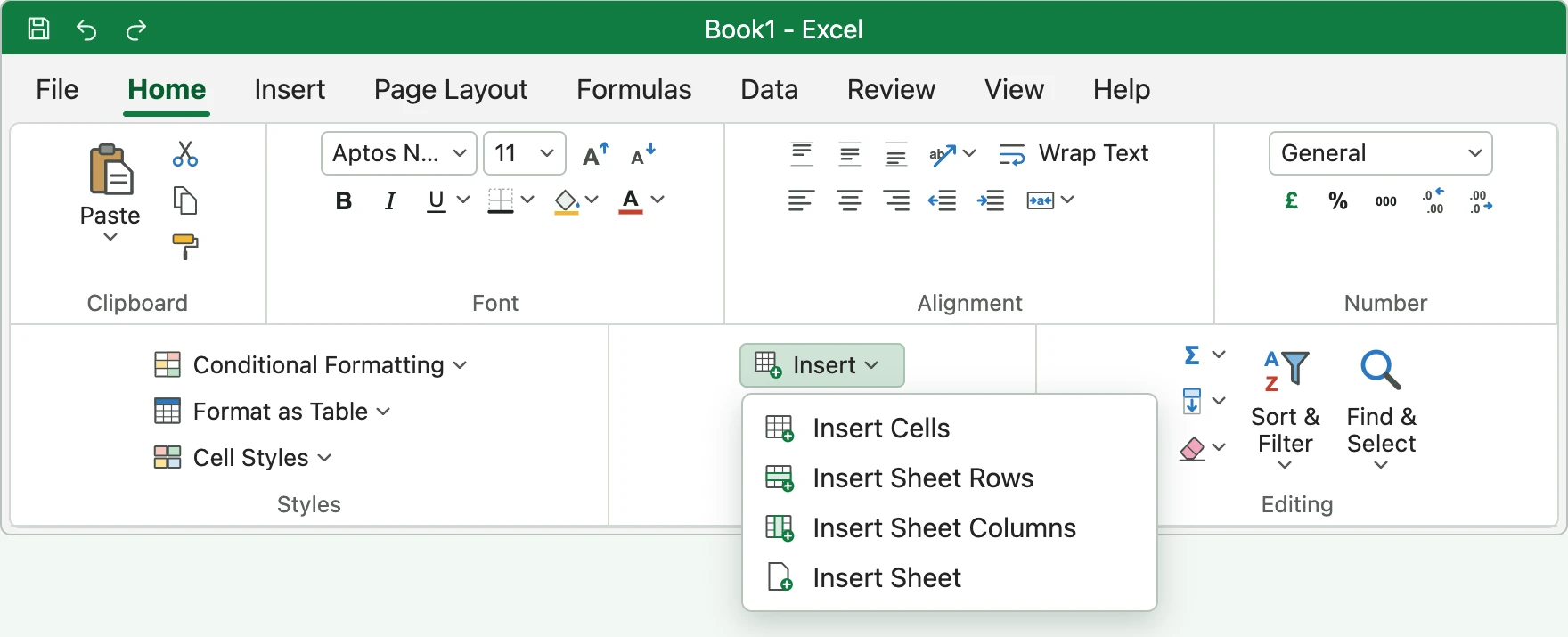
350+ flashcards for quick revision
Got two minutes? Go over functions, the ribbon, shortcuts, error messages and key terms. With a module, the cards you find hard come back on their own, and you can print the cards as a PDF.
What does it cost?
Without an account, you can try 3 lessons of your choice, a short test and ten basic practice questions every day. With a free account, you can do the 8 free lessons as often as you like and the first exercises of every other lesson. After that you choose a module, Beginner, Advanced or Expert, that stays yours for life. Or you take everything at once. See the modules.
Does it cost anything to start?
No. Without an account, you can try 3 lessons of your choice, a short basic test and ten basic practice questions every day. With a free account, you can do the 8 free lessons as often as you like and the first exercises of every other lesson. If you want more, you choose a module or Complete.
Do I need Excel on my computer?
No. Everything happens in your browser, including on a Chromebook or tablet. It also works on a phone, but you'll only see part of the worksheet, so a bigger screen is better for lessons and tests.
How does the site know what I did wrong?
Your formula is actually calculated and compared with what the task asks for. That way the site spots things like a range that's too small, a missing $ or text without quotation marks. If you're still stuck, you get a hint and then the solution.
Is it the same as the Excel I use at work?
Yes. You use the English function names with commas between the arguments, just like Excel in the UK, Ireland and the US. Dates, currency, tax and spelling follow your country, and you can switch between the UK, Irish and US versions in your account.
Is LearnExcel an official Microsoft course?
No. LearnExcel is not affiliated with Microsoft. Our three certificates show that you've completed a level on LearnExcel, and are not a Microsoft certification.
Start learning Excel today
3 lessons free, with no account needed. You type your first formula straight away and see what you can already do.